MSP Serverless platform application development #
1. Sorting out the basic concepts #
This article mainly introduces the concept and process of distributed development based on the msp serverless platform. Through the development of wasm as the smallest unit, it is fully applicable to the current distributed development environment. Before we start introducing application development, we need to be familiar with several concepts.
Whether it adopts the traditional single application development model, the microservice development model, or serverless, the problems it solves are basically similar, but the names of different models are different.
Generally speaking, application development can be divided into the following parts:
- **Pure business logic. *** Such as: commodity function, membership function, etc. For Business Development personnel. *
- **Middleware. *** Such as: database middleware, cache middleware, flow control, etc. For middleware developers, or platform developers. *
- **Operating Environment. ***According to different technology stacks, there are different operating environments, which belong to the infrastructure layer. For example, those deployed in containers generally run in k8s, and this part is aimed at platform developers. *
There are similar concepts in the msp serverless platform, which are listed here:
| Concept | For People | Instructions |
|---|---|---|
| actor | business development | where business logic is written, if it involves public capabilities (or middleware capabilities) that are not business logic, the capabilities are obtained by referencing the interface. Business people can use rust or tinyGo to develop actors. |
| interface | Middleware or platform development | Define some business-independent public capability interfaces, such as keyvalue capabilities, but do not provide specific implementations. Allowed operations can be defined in the interface, as well as various structures. Use smithy IDL to define the interface, and use the wash tool to generate the corresponding code. |
| provider | Middleware or platform development | The ability to implement the interface, for example, for the keyvalue function, it can be implemented by redis or by vault. And can be implemented with different technology stacks. Provider development can be done using rust, and Go will be officially supported in the future. |
| link def | Business development or deployment personnel | Since the actor only refers to the specific interface and does not specify which provider, it is necessary to associate the actor and the provider during actual deployment. It can be operated through the shell (wash) command line, or the platform. |
| wasm host | Middleware or platform development | As the running cornerstone of the entire msp serverless ecosystem, it is used to coordinate distributed communication between actors and providers, and also provides distributed scheduling capabilities. Implemented using Elixir/OTP technology stack. |
The overall relationship diagram is summarized as follows:
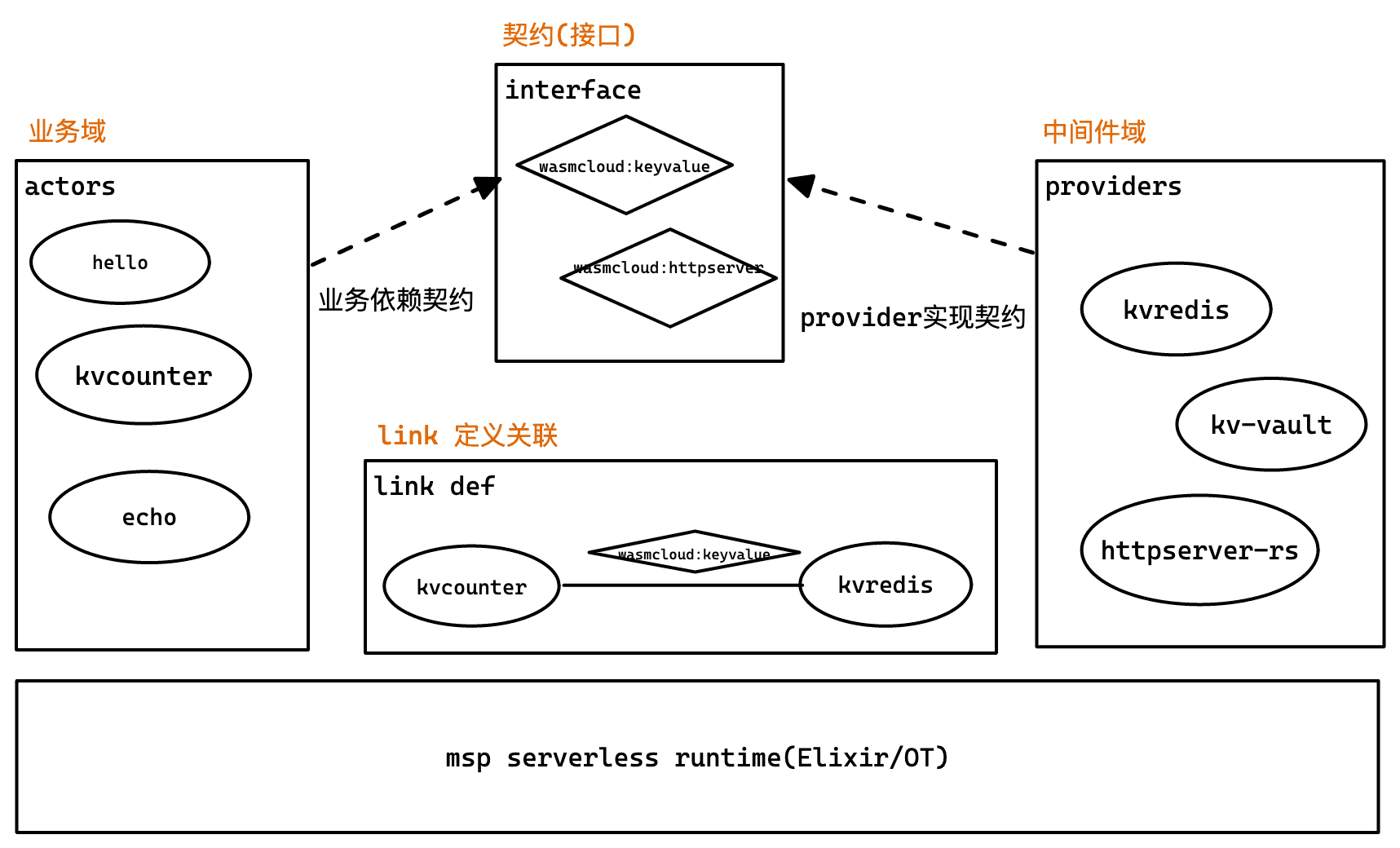
The development of msp serverless app is based on the contract (interface) development method, where interface is the definition of the contract.
3. Development process #
If we need to implement a brand new business scenario, we need to perform the following steps:

Next, take kvcounter as an example to further explain each link.
Example target: #
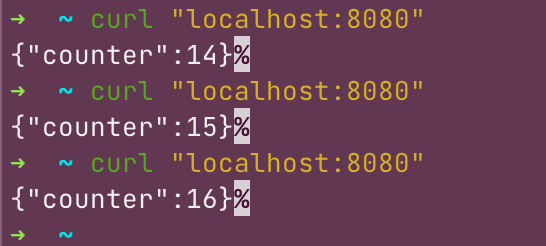
Develop a kvcounter sample program, when the user accesses http://localhost:8080, the counter can be displayed normally, and each access is +1.
The example effect is as follows:
1. Create (or use) interface #
In this example, we use the kv function, so we need to find an interface that can provide the keyvalue function. There are two ways, one is to find a ready-made interface, and the other is to define a keyvalue interface.
Here is an example of defining a new keyvalue.
1.1 Use the wash tool to create a new interface #
wash new interface keyvalue
1.2 Write interface, ie: smithy file #
First determine the operations provided by the interface, and then the structures involved in each operation (operations):
// key-value.smithy
// Definition of a key-value store and the 'wasmcloud:keyvalue' capability contract
//

// Tell the code generator how to reference symbols defined in this namespace
metadata package = [{
    namespace: "org.wasmcloud.interface.keyvalue",
    crate: "wasmcloud_interface_keyvalue",
    py_module: "wasmcloud_interface_keyvalue",
    doc: "Keyvalue: wasmcloud capability contract for key-value store",
}]

namespace org.wasmcloud.interface.keyvalue

use org.wasmcloud.model#wasmbus
use org.wasmcloud.model#rename
use org.wasmcloud.model#n
use org.wasmcloud.model#U32
use org.wasmcloud.model#I32

@wasmbus(
    contractId: "wasmcloud:keyvalue",
    providerReceive: true )
service KeyValue {
  version: "0.1.1",
  operations: [
    Increment, Contains, Del, Get,
    ListAdd, ListClear, ListDel, ListRange,
    Set, , SetAdd, SetDel, SetIntersection, SetQuery, SetUnion, SetClear,
  ]
}

/// Gets a value for a specified key. If the key exists,
/// the return structure contains exists: true and the value,
/// otherwise the return structure contains exists == false.
@readonly
operation Get {
  input: String,
  output: GetResponse,
}

/// Response to get request
structure GetResponse {
    /// the value, if it existed
    @required
    @n(0)
    value: String,
    /// whether or not the value existed
    @required
    @n(1)
    exists: Boolean,
}

/// Sets the value of a key.
/// expires is an optional number of seconds before the value should be automatically deleted,
/// or 0 for no expiration.
operation Set {
  input: SetRequest,
}

structure SetRequest {
    /// the key name to change (or create)
    @required
    @n(0)
    key: String,

    /// the new value
    @required
    @n(1)
    value: String,

    /// expiration time in seconds 0 for no expiration
    @required
    @n(2)
    expires: U32,
}

/// Deletes a key, returning true if the key was deleted
@rename([{lang:"Python", name:"delete"}])
operation Del {
  input: String,
  output: Boolean,
}

/// Increments a numeric value, returning the new value
operation Increment {
  input: IncrementRequest,
  output: I32
}

structure IncrementRequest {
    /// name of value to increment
  @required
  @n(0)
  key: String,
  /// amount to add to value
  @required
  @n(1)
  value: I32,
}

/// list of strings
list StringList {
  member: String
}

/// Append a value onto the end of a list. Returns the new list size
operation ListAdd {
  input: ListAddRequest,
  output: U32
}

/// Parameter to ListAdd operation
structure ListAddRequest {
    /// name of the list to modify
    @required
    @n(0)
    listName: String,

    /// value to append to the list
    @required
    @n(1)
    value: String,
}

/// Deletes a value from a list. Returns true if the item was removed.
operation ListDel{
  input: ListDelRequest,
  output: Boolean
}

/// Removes an item from the list. If the item occurred more than once,
/// removes only the first item.
/// Returns true if the item was found.
structure ListDelRequest {
    /// name of list to modify
  @required
  @n(0)
  listName: String,
  @required
  @n(1)
  value: String
}

/// Deletes a list and its contents
/// input: list name
/// output: true if the list existed and was deleted
operation ListClear {
  input: String,
  output: Boolean
}

/// Retrieves a range of values from a list using 0-based indices.
/// Start and end values are inclusive, for example, (0,10) returns
/// 11 items if the list contains at least 11 items. If the stop value
/// is beyond the end of the list, it is treated as the end of the list.
operation ListRange {
    input: ListRangeRequest,
    output: StringList,
}

structure ListRangeRequest {

    /// name of list
    @required
    @n(0)
    listName: String,

    /// start index of the range, 0-based, inclusive.
    @required
    @n(1)
    start: I32,

    /// end index of the range, 0-based, inclusive.
    @required
    @n(2)
    stop: I32,
}

/// Add an item into a set. Returns number of items added (1 or 0)
operation SetAdd {
  input: SetAddRequest,
  output: U32,
}

structure SetAddRequest {
    /// name of the set
    @required
    @n(0)
    setName: String,
    /// value to add to the set
    @required
    @n(1)
    value: String,
}

/// Deletes an item from the set. Returns number of items removed from the set (1 or 0)
operation SetDel {
  input: SetDelRequest,
  output: U32,
}

structure SetDelRequest {
  @required
  @n(0)
  setName: String,

  @required
  @n(1)
  value: String,
}

/// perform union of sets and returns values from the union
/// input: list of sets for performing union (at least two)
/// output: union of values
operation SetUnion {
  input: StringList,
  output: StringList,
}

/// perform intersection of sets and returns values from the intersection.
/// input: list of sets for performing intersection (at least two)
/// output: values
operation SetIntersection {
  input: StringList,
  output: StringList,
}

/// Retrieves all items from a set
/// input: String
/// output: set members
operation SetQuery {
  input: String,
  output: StringList,
}

/// returns whether the store contains the key
@readonly
operation Contains {
  input: String,
  output: Boolean,
}

/// clears all values from the set and removes it
/// input: set name
/// output: true if the set existed and was deleted
operation SetClear {
    input: String
    output: Boolean
}
We see that the smithy file only defines the relevant interfaces, and does not involve specific implementations. This is also an important concept in msp serverless app development.
**Actor only depends on a specific interface, and an interface can be implemented by multiple providers. **
1.3 Generate code and publish it to the corresponding warehouse, which is convenient for actor developers to use #
We can directly execute the make command to generate the corresponding code. After that, you can publish the interface to crate.io, or use the local path to import it as a package dependency (the same is true for Go language, just send the package). In this way, when the actor is actually developed, the interface can be directly introduced and used as a dependency package of the project.
2. Development provider #
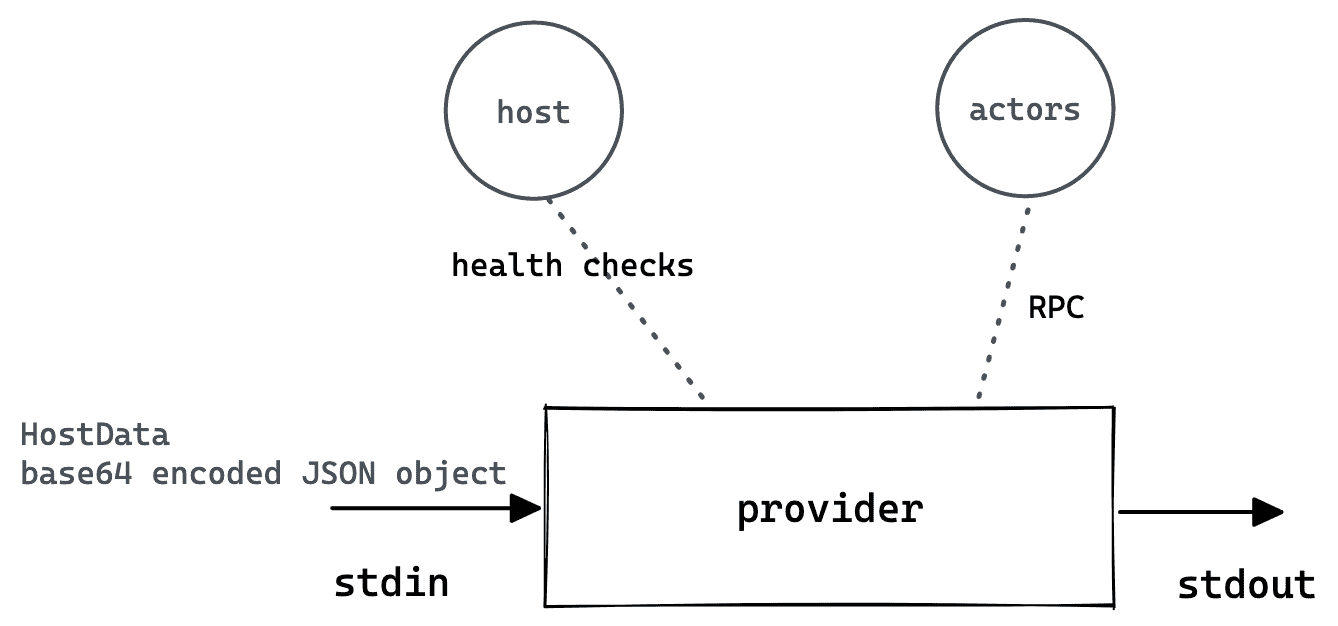
The role of the provider is as follows: After startup, it interacts with the host through stdio, and its main functions include: health check, interaction with actors through RPC, etc.
2.1 Use wash to create a new provider #
Through the wash command, you can generate template code for provider
wash new provider kvredis
2.2 Write provider #
The focus is to implement various operations defined in the interface based on redis. For the complete code, see the link. The core code framework is excerpted as follows:
/// Handle KeyValue methods that interact with redis
#[async_trait]
impl KeyValue for KvRedisProvider {
		/// Increments a numeric value, returning the new value
    #[instrument(level = "debug", skip(self, ctx, arg), fields(actor_id = ?ctx.actor, key = %arg.key))]
    **async fn increment**(&self, ctx: &Context, arg: &IncrementRequest) -> RpcResult<i32> {
        let mut cmd = redis::Cmd::incr(&arg.key, &arg.value);
        let val: i32 = self.exec(ctx, &mut cmd).await?;
        Ok(val)
    }

    /// Deletes a key, returning true if the key was deleted
    #[instrument(level = "debug", skip(self, ctx, arg), fields(actor_id = ?ctx.actor, key = %arg.to_string()))]
    **async fn del**<TS: ToString + ?Sized + Sync>(&self, ctx: &Context, arg: &TS) -> RpcResult<bool> {
        let mut cmd = redis::Cmd::del(arg.to_string());
        let val: i32 = self.exec(ctx, &mut cmd).await?;
        Ok(val > 0)
    }

    /// Gets a value for a specified key. If the key exists,
    /// the return structure contains exists: true and the value,
    /// otherwise the return structure contains exists == false.
    #[instrument(level = "debug", skip(self, ctx, arg), fields(actor_id = ?ctx.actor, key = %arg.to_string()))]
    **async fn get**<TS: ToString + ?Sized + Sync>(
        &self,
        ctx: &Context,
        arg: &TS,
    ) -> RpcResult<GetResponse> {
        let mut cmd = redis::Cmd::get(arg.to_string());
        let val: Option<String> = self.exec(ctx, &mut cmd).await?;
        let resp = match val {
            Some(s) => GetResponse {
                exists: true,
                value: s,
            },
            None => GetResponse {
                exists: false,
                ..Default::default()
            },
        };
        Ok(resp)
    }

    /// Sets the value of a key.
    /// expires is an optional number of seconds before the value should be automatically deleted,
    /// or 0 for no expiration.
    #[instrument(level = "debug", skip(self, ctx, arg), fields(actor_id = ?ctx.actor, key = %arg.key))]
    **async fn set**(&self, ctx: &Context, arg: &SetRequest) -> RpcResult<()> {
        let mut cmd = match arg.expires {
            0 => redis::Cmd::set(&arg.key, &arg.value),
            _ => redis::Cmd::set_ex(&arg.key, &arg.value, arg.expires as usize),
        };
        let _value: Option<String> = self.exec(ctx, &mut cmd).await?;
        Ok(())
    }
2.3 Generate provider product #
Simply use the make command to complete the deployment of the product, which can be pushed to the OCI repository for easy use.
2.4 Push to repository #
The packaged code can be pushed to the mirror repository through the make push command. You need to modify the REG_URL configuration in the Makefile to the mirror repository you need to push. If you are a test repository and access it through the http protocol, then you can push normally. If you are a formal repository, you need to access and user authentication through https, then you also need to modify the PUSH_REG_CMD option in the Makefile to wash reg push $(REG_URL), and define two environment variables WASH_REG_USER and WASH_REG_PASSWORD respectively user name and password.
3. Develop actors #
Actor is the smallest deployment unit in the msp serverless technology ecosystem, and it is also a wasm module. It is used to process messages passed to him by msp serverless host, and can call functions provided by provider.
3.1 New actor #
Using the wash command can easily generate template code for rapid development:
wash new actor kvcounter
3.2 Developing actors #
Declare contract dependencies
kvcounter relies on two interfaces to provide two capabilities: httpserver capability and kv storage capability.
We need to declare this dependency so that after kvcounter is packaged, the corresponding information can be inspected.
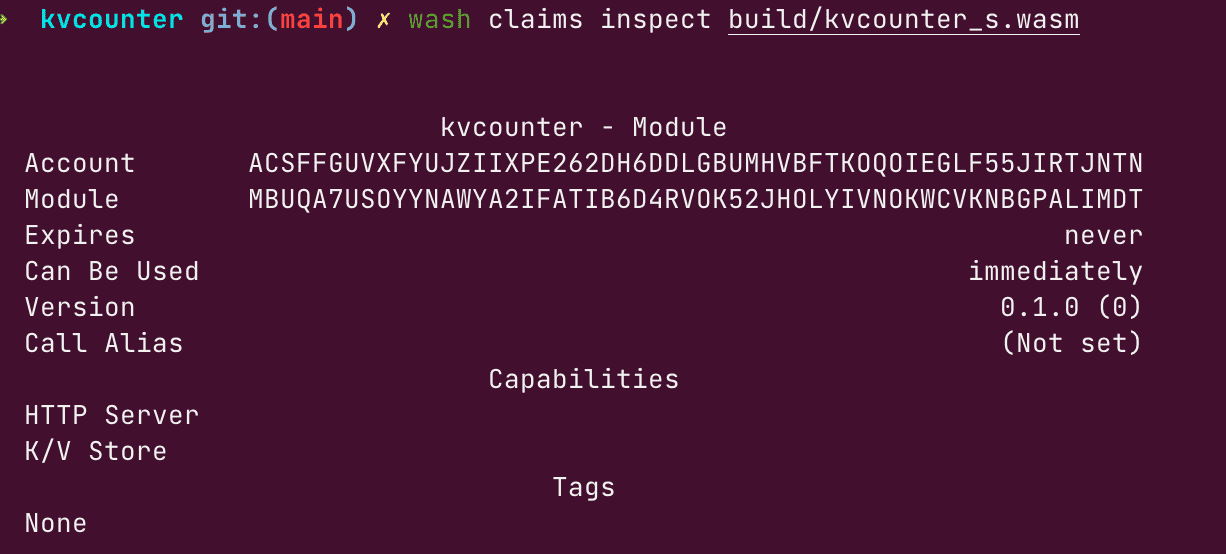
So we need to modify the CLAIMS information of the makefile:
# examples/actor/kvcounter

PROJECT = kvcounter
VERSION = $(shell cargo metadata --no-deps --format-version 1 | jq -r '.packages[] .version' | head -1)
REVISION = 0
# list of all contract claims for actor signing (space-separated)
**CLAIMS=wasmcloud:httpserver wasmcloud:keyvalue**
using interface
Depending on the language, we can introduce different interface packages. Taking rust as an example, we can add two packages that kvcounter depends on in cargo.toml:
[package]
name = "kvcounter"

[dependencies]
**wasmcloud-interface-keyvalue = "0.7.0"**
**wasmcloud-interface-httpserver = "0.6.0"**
In the actor call:
#[async_trait]
impl HttpServer for KvCounterActor {
    async fn handle_request(&self, ctx: &Context, req: &HttpRequest) -> RpcResult<HttpResponse> {
        // increment the value in kv and send response in json
        let (body, status_code) = match **increment_counter**(ctx, key, amount).await {
            Ok(v) => (json!({ "counter": v }).to_string(), 200),
            // if we caught an error, return it to client
            Err(e) => (json!({ "error": e.to_string() }).to_string(), 500),
        };
        let resp = HttpResponse {
            body: body.as_bytes().to_vec(),
            status_code,
            ..Default::default()
        };
        Ok(resp)
    }
}

/// increment the counter by the amount, returning the new value
async fn increment_counter(ctx: &Context, key: String, value: i32) -> RpcResult<i32> {
    let new_val = KeyValueSender::new()
        **.increment(ctx, &IncrementRequest { key, value })**
        .await?;
    Ok(new_val)
}
3.4 Packaging #
We can use the make command to package the code as a .wasm file and push it to the OCI repository.
3.5 Push position #
The packaged code can be pushed to the mirror repository through the make push command. You need to modify the REG_URL configuration in the Makefile to the mirror repository you need to push. If you are a test repository, you can access it through the http protocol, then you can push it normally. If you are a formal repository and need to access via https and user authentication, then you also need to modify the PUSH_REG_CMD option in the Makefile to wash reg push $(REG_URL), and define the two environment variables WASH_REG_USER and WASH_REG_PASSWORD respectively user name and password.
Of course you can push directly via the wash command instead of the make command: wash reg push yourharbor/name:version build/wasmfile
4. Deployment #
We can deploy using wasm shell (i.e. wash) or web dashboard. The main operations are as follows:
- Start actors. Upload the actor’s wasm file to the serverless runtime, or provide a registry address for it to download.
- start providers. Upload the provider’s package to the serverless runtime, or provide a registry address for it to download.
- Establish a link relationship.
The screenshots of the operation on the platform are as follows:
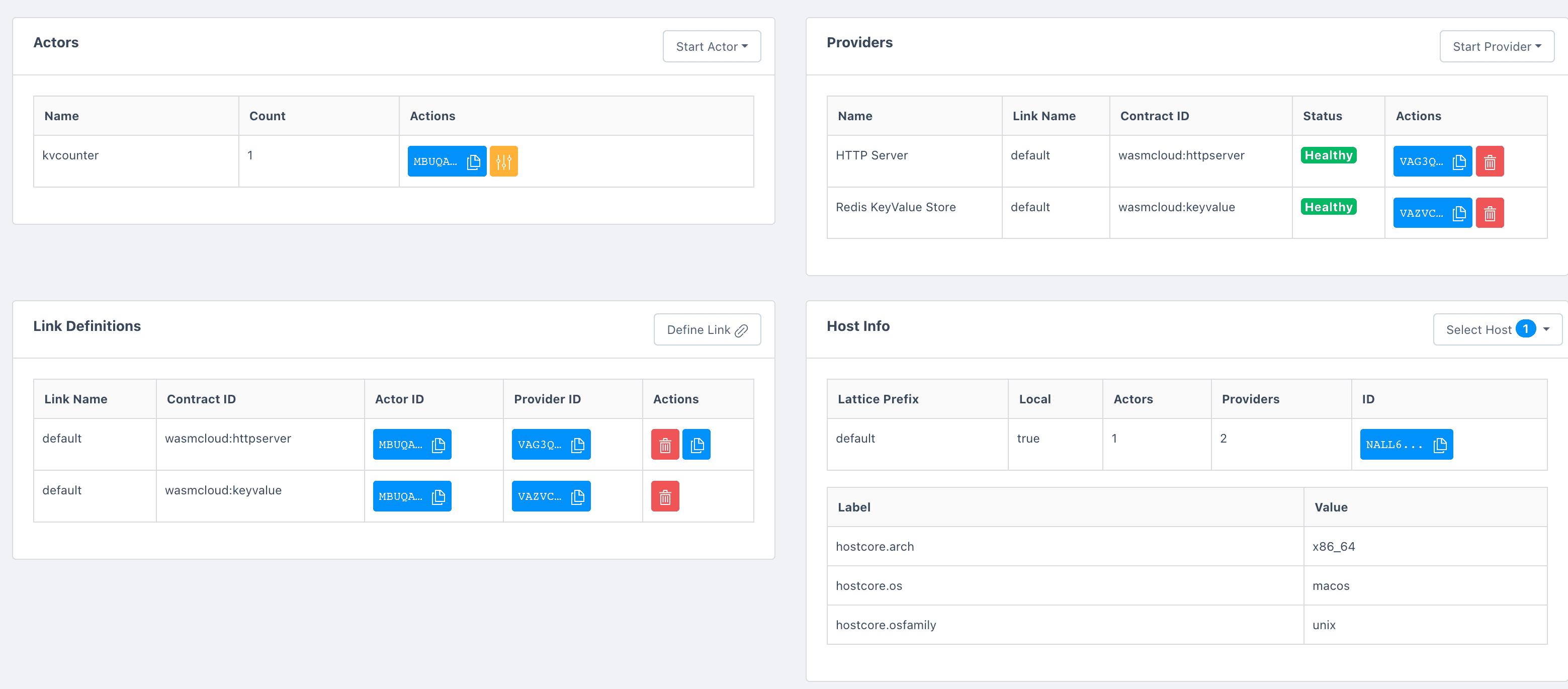
It should be noted here that the actor of kvcounter needs to be linked with httpserver and kvredis provider respectively, that is, there are two link records.
5. Access #
So far, it can be accessed normally through http.
➜ ~ curl localhost:8080
{"counter":17}%
➜ ~ curl localhost:8080
{"counter":18}%
Summarize #
This article mainly summarizes the overview of msp serverless application development, including the main concepts involved, the use of the tool chain, and the main development process. During use, if you encounter problems, you can contact the msp platform team for more support.