Auto Scaling #
Introduction #
Using the “Auto Scaling” function, you can get the following benefits:
- Improve stability: Provide a way to automatically expand and shrink services according to service traffic load to improve service availability
- Cost reduction: On-demand real-time elasticity can avoid resource waste and maximize resource advantages
Currently, the Auto Scaling function can configure scaling rules for a single service. The rules support concurrency and RPS (number of requests per second), you can set the target value of a duplicate, and when the average single copy reaches the target value, the expansion operation will be triggered. You can set the maximum number of duplicates and the minimum number of duplicates to limit the upper and lower limits of scaling.
Tips
Note that the RPS here includes current-limiting requests but does not include health check requests
Plaform Usage #
Intro to platform #
Currently the platform side supports the following operations
- Service scaling configuration for a single service
- Provide telemetry data related to scaling
Service scaling configuration #
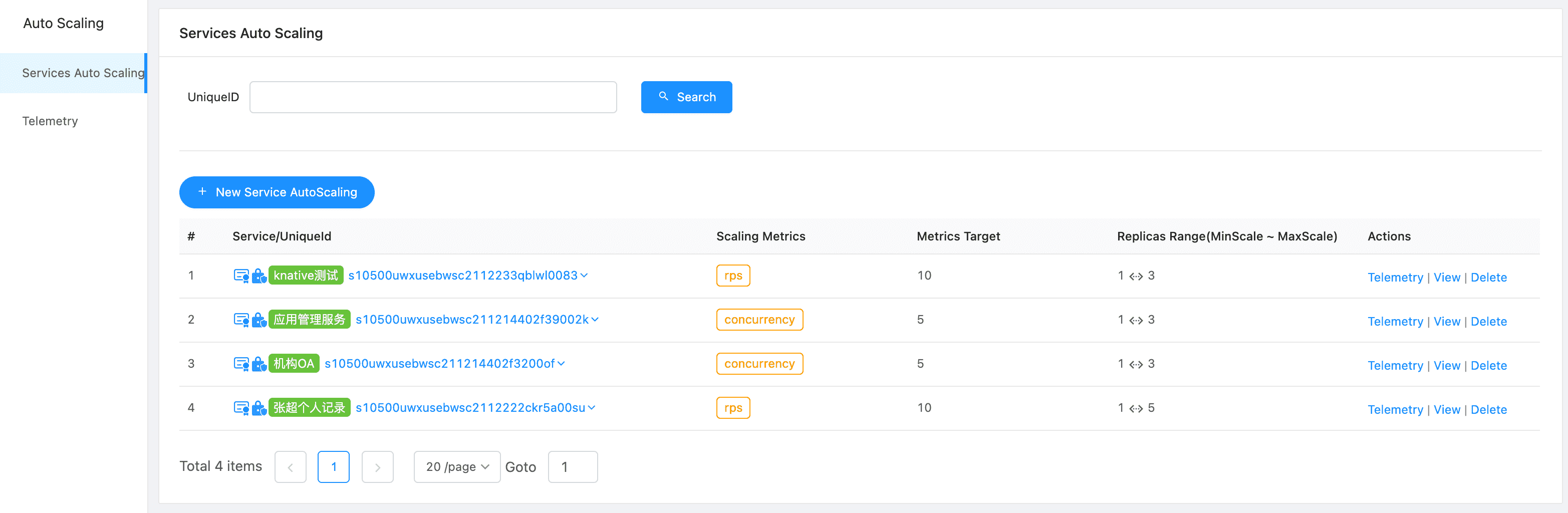
Services
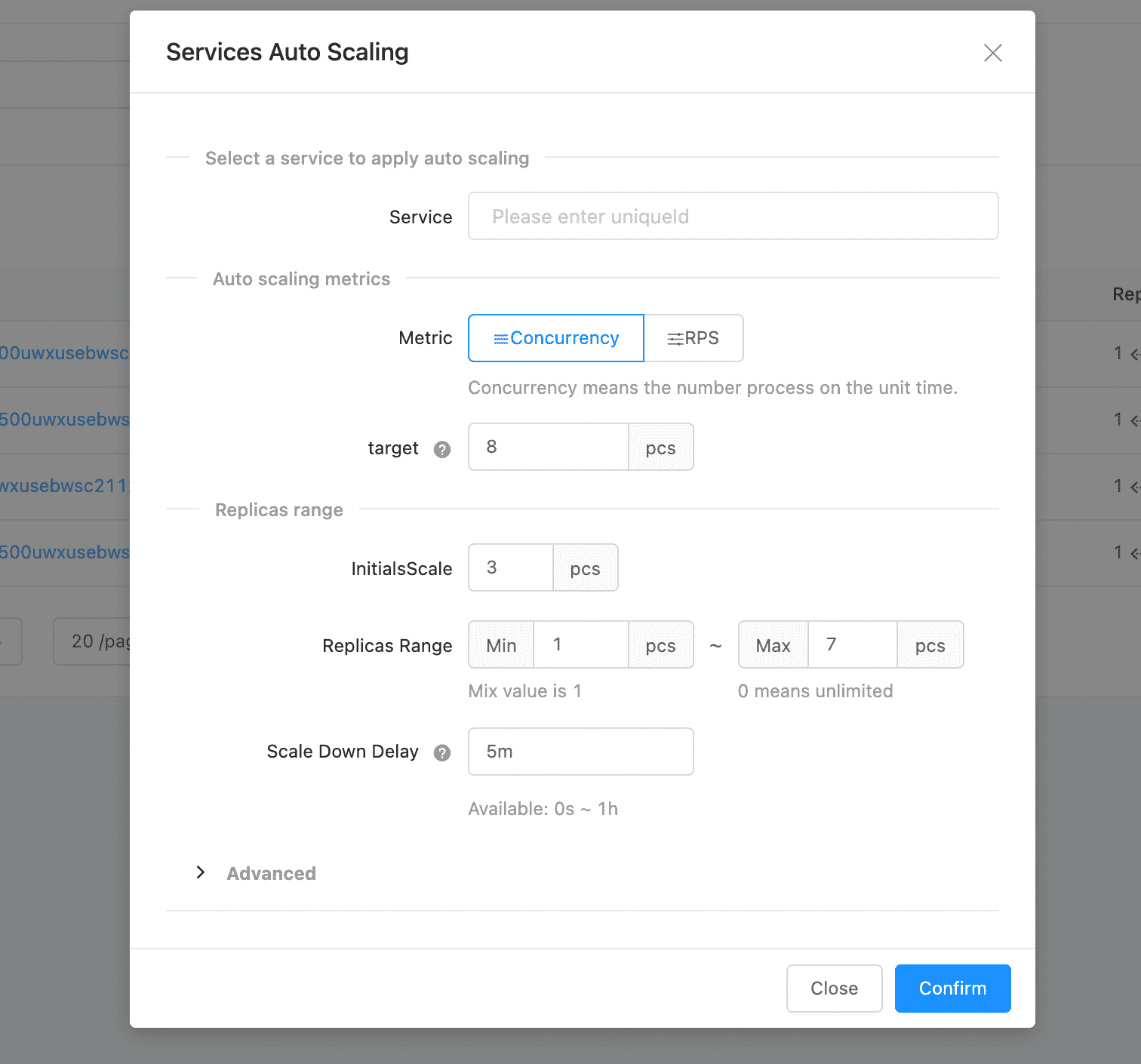
Configuration
About Metrics Choice
Concurrency: For services with slow request responses, especially PHP services, due to the limitations of php-fpm, it is recommended to use a concurrent scaling configuration. Because in this case it is easier to reach the concurrency bottleneck.
RPS: For services with fast request responses, especially go services, it is recommended to use the RPS-type scaling configuration. Because this type of service usually has an upper limit of concurrent requests per second, but it is relatively less sensitive to the number of simultaneous concurrency.
Configuration explain
| Item | Description |
|---|---|
| Metric | concurrency can be understood as “concurrency”, that is: the total number of requests being processed within the specified time range. rps is understood as “throughput”, that is: the total number of requests arriving at the service per second, including the number of requests for current limit, but not including requests for health checks. |
| target | The target value of the scaling metric, whether the metric is concurrent or rps metric, the target value is for a single pod. Take rps as an example, assuming that the single-copy target value is 10, there are currently 3 copies. Then, when the number of requests per second reaches 30, that is, an average of 10 copies per copy will trigger the expansion operation. When the number of requests per second is less than 20, the scaling operation will be triggered to scale down to two replicas. |
| InitialsScale | Number of initial replicas of the deployed service. It is recommended to set it to 1. This setting is mostly meaningful when scaling to 0. Because most services may perform some time-consuming operations at startup, such as database migration. Therefore, if the minimum number of replicas of the service is 0, the initial number of replicas can allow the service to initialize in advance and reduce the cold start delay. |
| Replicas Range | Minimum: The current scaling to 0 has not been completed. Therefore, the minimum number of replicas should be at least 1. If the service traffic is relatively large, the minimum number of replicas can be set according to actual needs. Maximum: The maximum number of replicas for the service, 0 means no upper limit. |
| Scale Down Delay | When it needs to be scaled down according to the traffic index calculation, it will not scale down immediately, but wait for the replica scaling delay time before scaling down. If during this process, the traffic returns to a high-traffic state, the scaling operation will be abandoned. In order to prevent frequent expansion and contraction operations, the capacity is usually not immediately reduced to prevent the arrival of burst traffic at short intervals. The scaling delay of the service can be set according to the actual situation of the service. The recommended time is 5 minutes to 1 hour (5m-1h). |
Advanced
This part of the parameters can usually use the default value without changing, there will be a more general default value. When you want to have more fine-grained control over your services, you can learn more about this part of the parameters
| Item | Description |
|---|---|
| Normal Mode Window | Use a sliding time window to count the scaling indicator values. The longer the time, the smoother the expansion and contraction. The smaller the time, the more sensitive the scaling is. The minimum value is 6s and the maximum value is 1h. It is recommended that the minimum value should not be less than 20s. If you want a more sensitive response, you can configure it through the emergency time window. Assuming that the Normal Mode Window is 60s and the scaling type is rps, the indicator used to calculate whether scaling is required is the average rps in the past 60s. |
| Panic Window | Emergency mode is officially called panic mode, which is a mode designed to quickly respond to load changes. The Panic Window is a percentage of the Normal Mode Window. For example, the Normal Mode Window is 40s, and the emergency mode window time is set to 10, then the Panic Window is 4s. Please note that the calculated time must be greater than 2s, otherwise the scaling state may be lost. If it is less than 1s, the emergency mode will not take effect. In short, the Panic Window is smaller and more sensitive. Emergency mode not only has its own time window, but also its own indicators. |
| Panic Threshold Percentage | This threshold is also a percentage, expressed as a percentage of a multiple of the single-replica target value. The minimum value is 110 and the maximum value is 10000. In the time window of emergency mode, when the indicator exceeds the threshold of the emergency mode indicator, it will enter the expansion state to respond to burst traffic faster. |
| Target Utilization Percentage | When the percentage of the set target target value is reached, the capacity will be expanded in advance to ensure service stability. This is set as a percentage of the target value of the indicator. Usually, in order to improve the availability of the service, the expansion is not started until the target is reached, but the expansion is started when the limit is reached. For example, if concurrency is defined as 10, and this value is 70 (percentage), then the maximum concurrency that a pod can carry is still 10, but when the concurrency reaches 7, it will start to expand. |